Note
Access to this page requires authorization. You can try signing in or changing directories.
Access to this page requires authorization. You can try changing directories.
Agents can support asynchronous workflows. Asynchronous flows continue running beyond the previous two-minute limit while still returning a response to the agent after execution completes. This feature is available only in environments running on the new infrastructure.
Enable asynchronous responses
To allow a flow to continue running beyond two minutes and respond asynchronously to the agent:
Open your agent flow and ensure it uses the When an agent calls the flow trigger.
Select the Respond to the agent action on the canvas. The action configuration pane opens.
Select Settings.
Turn on Asynchronous response.
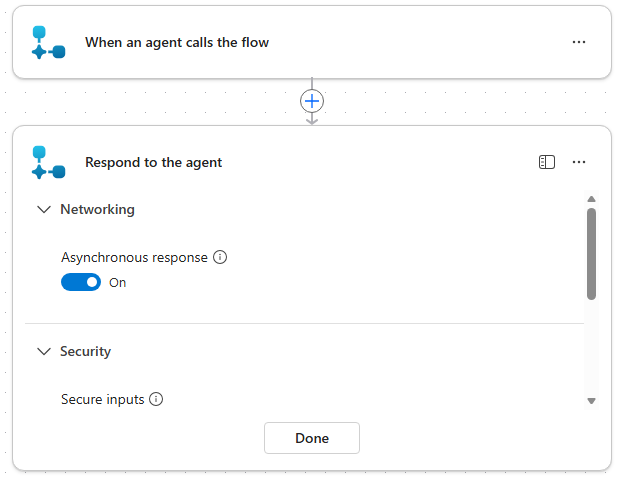
Save or publish the flow.
With this setting, long-running flows continue beyond the normal two-minute limit and return a callback response to the agent once they finish. If the user sends another message before the flow completes, the flow runs to completion, but the agent responds to the user's latest request without waiting for the flow to finish first.
Note
The callback feature for asynchronous flows is fully supported in Microsoft Teams. Other channels might also support callbacks, but they aren't formally tested. Callbacks aren't supported for Microsoft 365 Copilot and telephony channels.
If you need your agent to respond immediately, remove the response action from the flow, as described in the Enable immediate responses section.
Enable immediate responses
If your environment supports asynchronous response but you want the agent to respond immediately, remove the Respond to the agent action from the flow. The agent then responds immediately after it successfully triggers the flow.
Environments without asynchronous response feature support
If your environment doesn't support asynchronous response, the agent might receive a "flow completed" response immediately while the flow continues to run in the background.