Note
Access to this page requires authorization. You can try signing in or changing directories.
Access to this page requires authorization. You can try changing directories.
The ai.similarity function compares text by meaning. Compare one column with a single reference value or with pairwise values in another column.
Note
- This article covers
ai.similaritywith PySpark. For pandas, see Use ai.similarity with pandas. - For all AI Functions and prerequisites, see AI Functions overview.
- Change default configuration for AI Functions with PySpark.
Overview
The ai.similarity function is available for Spark DataFrames. You must specify the name of an existing input column as a parameter. You must also specify a single common text value for comparisons, or the name of another column for pairwise comparisons.
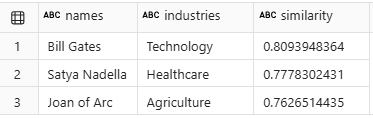
The function returns a new DataFrame that includes similarity scores for each row of input text that's in an output column.
Syntax
df.ai.similarity(input_col="col1", other="value", output_col="similarity")
Parameters
| Name | Description |
|---|---|
input_col Required |
A string that contains the name of an existing column with input text values to use for computing similarity scores. |
other or other_col Required |
Only one of these parameters is required. The other parameter is a string that contains a single common text value used to compute similarity scores for each row of input. The other_col parameter is a string that designates the name of a second existing column, with text values used to compute pairwise similarity scores. |
output_col Optional |
A string that contains the name of a new column to store calculated similarity scores for each input text row. If you don't set this parameter, a default name generates for the output column. |
error_col Optional |
A string that contains the name of a new column that stores any OpenAI errors that result from processing each input text row. If you don't set this parameter, a default name generates for the error column. If an input row has no errors, this column has a null value. |
Returns
The function returns a Spark DataFrame that includes a new column that contains generated similarity scores for each input text row. The output similarity scores are relative, and they're best used for ranking. Score values can range from -1 (opposites) to 1 (identical). A score of 0 indicates that the values are unrelated in meaning.
Example
# This code uses AI. Always review output for mistakes.

df = spark.createDataFrame([
        ("Bill Gates",),
        ("Sayta Nadella",),
        ("Joan of Arc",)
    ], ["names"])

similarity = df.ai.similarity(input_col="names", other="Microsoft", output_col="similarity")
display(similarity)
Output:

Related content
- Use ai.similarity with pandas.
- Learn more about AI Functions.
- Change default configuration for AI Functions with PySpark.
- Understand billing for AI Functions.