Note
Access to this page requires authorization. You can try signing in or changing directories.
Access to this page requires authorization. You can try changing directories.
The Model Context Protocol (MCP) lets AI models, like Azure OpenAI models, interact with external tools and resources. MCP makes it easier for agents to find, connect to, and use enterprise data.
When you integrate MCP with Azure Data Explorer clusters, you get AI-driven insights and actions in real time. An MCP server lets AI agents or AI applications interact with Azure Data Explorer by providing tools through the MCP interface. You use these tools to query and analyze data.
Note
This feature is in preview.
Servers for building AI agents
MCP support for Azure Data Explorer is a full open-source MCP server integration. It supports natural language queries and allows agents to discover schemas and metadata dynamically. An MCP server can be used with various AI clients, such as GitHub Copilot, Cline, or Claude Desktop.
You can use the following MCP servers to integrate and build AI agents with Azure Data Explorer:
Fabric Real-Time Intelligence MCP server (preview). This server is designed for use with Azure Data Explorer clusters or with a Real-Time Intelligence eventhouse. It provides a unified interface for AI agents to query, reason, and act on real-time data.
Azure MCP Server instance (preview). Azure MCP Server allows you to manage Azure Data Explorer resources by using natural language prompts. You can list clusters, view databases, query data, and more without remembering complex Kusto Query Language (KQL) syntax.
The most common scenario for using the Real-Time Intelligence MCP server or an Azure MCP Server instance is to connect to it from an existing AI client. The AI client can then use the available tools to access and interact with Azure Data Explorer resources by using natural language.
For example, you can use GitHub Copilot agent mode with the Real-Time Intelligence MCP server to list KQL databases or run natural language queries on Azure Data Explorer clusters.
Architecture
The MCP server is at the core of the system and acts as a bridge between AI agents and Azure Data Explorer data sources. Agents send requests to the MCP server, which translates them into Azure Data Explorer queries.
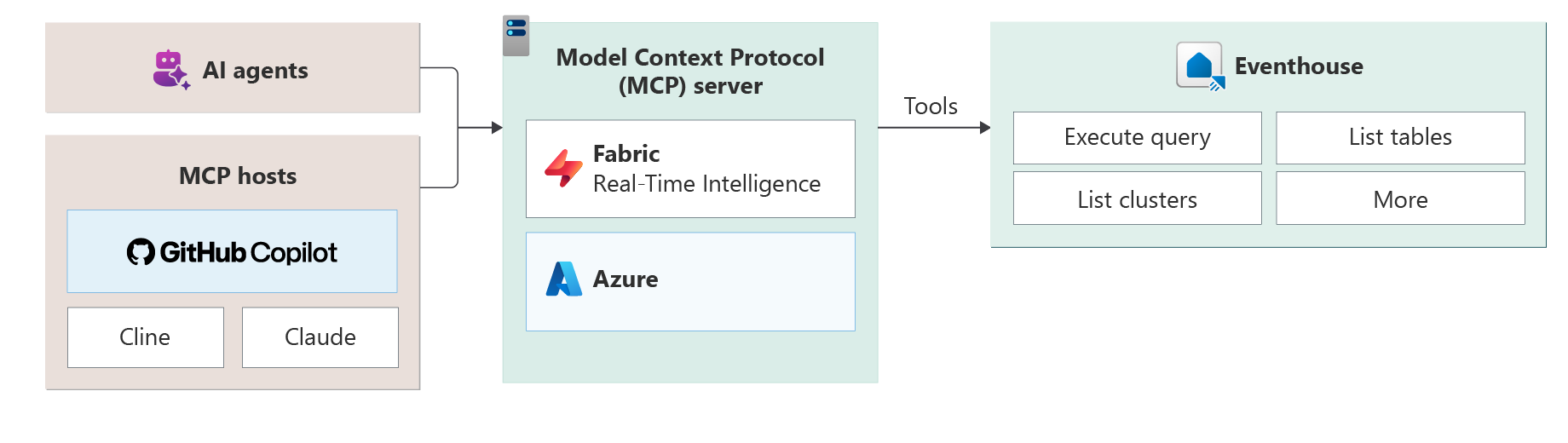
With this architecture, you can build modular, scalable, intelligent applications that respond to real-time signals. MCP uses a client/server architecture, so AI applications can interact with external tools efficiently. The architecture includes the following components:
- MCP host. The application where AI interactions happen. For example, the host can be Visual Studio Code with GitHub Copilot, Claude Desktop, or Cline. The host contains the AI model connection, a tool orchestrator, and one or more MCP clients.
- MCP server. A lightweight application that exposes specific capabilities by using natural language APIs and databases. For example, you use an MCP server to run KQL queries for real-time data retrieval from Azure Data Explorer clusters.
Key features
Real-time data access. Retrieve data from Azure Data Explorer clusters in seconds.
Natural language interfaces. Users or agents ask questions in plain English or other languages, and the system turns them into optimized queries. For more information, see this blog post about the NL2KQL framework.
Schema discovery. MCP servers show schema and metadata, so agents can learn data structures dynamically.
Plug-and-play integration. MCP clients like GitHub Copilot, Claude, and Cline connect to Real-Time Intelligence with minimal setup because of standardized APIs and discovery mechanisms.
Local language inference. Use your preferred language to work with your data.
Considerations and limitations
Security
MCP is a new phenomenon. As with all new technology standards, consider doing a security review to ensure that any systems that integrate with MCP servers follow all regulations and standards that your system must adhere to. This review includes not only the Real-Time Intelligence MCP servers, but any MCP client or agent that you choose to implement (down to the model provider).
You should follow Microsoft security guidance for MCP servers, including enabling Microsoft Entra ID authentication, secure token management, and network isolation. For more information, see the Microsoft security documentation.
Permissions and risk
MCP clients can invoke operations based on the user's Microsoft Entra ID permissions. Autonomous or misconfigured clients might perform destructive actions. Review and apply least-privilege permissions and implement safeguards before deployment.
Certain safeguards, such as flags to prevent destructive operations, aren't standardized in the MCP specification and might not be supported by all clients.
Compliance responsibility
An MCP server might be installed with, be used with, and share data with clients and services. These clients and services can include non-Microsoft large language models (LLMs), AI agents, or services that operate outside the compliance boundaries of Fabric. You're responsible for ensuring that any integration complies with applicable organizational, regulatory, and contractual requirements.