Bemærk
Adgang til denne side kræver godkendelse. Du kan prøve at logge på eller ændre mapper.
Adgang til denne side kræver godkendelse. Du kan prøve at ændre mapper.
Applies to:  SQL Server on Windows
Buffer pool extension integrates SSD storage with the Database Engine buffer pool to improve database performance without incurring high costs of additional memory.
The buffer pool extension isn't available in every SQL Server edition. For more information, see Editions and supported features of SQL Server 2025.
Benefits of the buffer pool extension
Because disk I/O operations can take a relatively long time to finish, they're a performance bottleneck in many workloads.
The typical approach to reducing disk I/O is to add more memory for use as a data cache. While helpful, the drawback of this approach is the high memory cost.
The buffer pool extension feature extends the buffer pool cache with nonvolatile storage such as local SSD drives. With this extension, the buffer pool can accommodate a larger database working set, replacing a significant portion of the slower remote I/O with the faster local SSD I/O. Because of the lower latency and better I/O performance of SSDs, the buffer pool extension can improve performance, particularly with the slower remote I/O systems.
The following list describes the benefits of the buffer pool extension feature.
- Increased I/O throughput
- Reduced I/O latency
- Increased transaction throughput
- Improved read performance with a larger hybrid buffer pool
- A caching architecture that can take advantage of present and future low-cost memory drives
Buffer pool extension concepts
The following terms are applicable to the buffer pool extension feature.
| Term | Description |
|---|---|
| Buffer | In the Database Engine, a buffer is an 8-KB page in memory, the same size as a data or index page. Thus, the buffer cache is divided into 8-KB pages. A page stays in the buffer cache until the buffer manager needs the buffer area to read more data. Data is written back to disk only if it's modified. These in-memory modified pages are known as dirty pages. A page is clean when it's equivalent to its database image on disk. Data in the buffer cache can be modified multiple times before being written back to disk. |
| Buffer pool | Also called buffer cache. All databases use the buffer pool as a global resource for their cached data pages. The startup process or sp_configure dynamically reconfigures the Database Engine instance to determine the maximum and minimum size of the buffer pool cache. This size determines the maximum number of pages that an instance can cache in the buffer pool. External memory pressure can reduce the size of the buffer pool and limit the memory that the buffer pool extension can cache. |
| Checkpoint | A checkpoint creates a known good point from which the Database Engine can start applying changes contained in the transaction log during recovery after an unexpected shutdown or crash. A checkpoint writes the dirty pages and transaction log information from memory to disk. For more information, see Database checkpoints (SQL Server). |
Buffer pool extension architecture
By using buffer pool extension, you can use SSD storage as an extension to the memory subsystem, rather than a part of the disk subsystem. The buffer pool extension file enables the buffer pool manager to use both DRAM and NAND flash memory to maintain a much larger buffer pool of pages on SSDs.
This architecture creates a multilevel caching hierarchy with level 1 (L1) as the DRAM and level 2 (L2) as the buffer pool extension file on the SSD. Only clean pages are written to the L2 cache, which helps maintain data safety. The buffer manager handles the movement of clean pages between the L1 and L2 caches.
The following illustration provides a high-level architectural overview of the buffer pool relative to other Database Engine components.
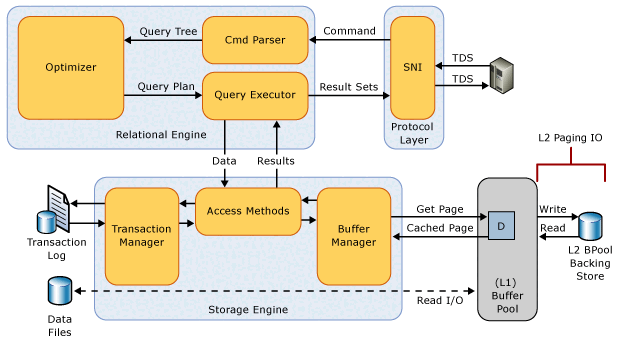
When you enable the buffer pool extension, you specify the size and file path of the buffer pool caching file on the SSD. This file is a contiguous extent of storage on the SSD and is statically configured during startup of the Database Engine instance. You can only alter the file configuration parameters when the buffer pool extension feature is disabled. When you disable the buffer pool extension, the system removes all related configuration settings from the registry. The system deletes the buffer pool extension file upon Database Engine shutdown.
Buffer pool extension configuration
Use ALTER SERVER CONFIGURATION to configure buffer pool extension.
The system considers the physical memory available to the Database Engine instance at startup to enforce the minimum and maximum buffer pool extension size.
Maximum size
The maximum buffer pool extension size depends on the SQL Server edition and differs for physical and virtual machines.
If you configure a size that exceeds the maximum, the Database Engine returns error 864 and doesn't enable the buffer pool extension.
SQL Server Enterprise, Enterprise Developer, and Developer editions support up to 32 times the physical memory.
SQL Server Standard and Standard Developer editions on physical machines support up to 4 times the physical memory.
Up to a maximum of 512 GB in SQL Server 2022 (16.x) and earlier versions.
Up to a maximum of 1 TB in SQL Server 2025 (17.x) and later versions.
SQL Server Standard and Standard Developer editions on virtual machines support up to 16 times the physical memory.
For more information, see Editions and supported features of SQL Server 2025.
Minimum size
The buffer pool extension size must be larger than the smallest of the physical memory and max server memory (MB) values. If the configured size is smaller than this minimum, the Database Engine raises error 868. If the configured size is smaller than this minimum on instance startup, error 861 is logged and the buffer pool extension isn't enabled.
Configuration change behavior
You can increase max server memory (MB) to a value that's higher than the buffer pool extension size while the extension is enabled. The Database Engine logs an informational message (error 5866) and applies the change. However, because the new value violates the minimum size requirement, the buffer pool extension is disabled the next time the instance restarts.
If you enable buffer pool extension with a size that's below max server memory (MB), the operation fails with error 868.
Buffer pool extension best practices
Consider the following best practices:
- After you enable buffer pool extension for the first time, restart the Database Engine instance to get the maximum performance benefits.
- Set the buffer pool extension so the ratio between the size of physical memory and the size of the buffer pool extension is 1:16 or less. A lower ratio in the range of 1:4 to 1:8 might be optimal. For information about setting the
max server memory (MB)option, see Server memory configuration options. - Test the buffer pool extension thoroughly before implementing it in a production environment. Once in production, avoid making configuration changes to the file or turning off the feature. These activities might have a negative effect on server performance because the buffer pool is significantly reduced in size when the feature is disabled. When disabled, the memory used to support the feature isn't reclaimed until the instance of SQL Server is restarted. However, if the feature is re-enabled, the memory is reused without restarting the instance.
Monitor buffer pool extension
You can use the following dynamic management views to display the configuration of the buffer pool extension and return information about the data pages in the extension.
Performance counters are available in the SQL Server, Buffer Manager object to track the data pages in the buffer pool extension file. For more information, see SQL Server, Buffer Manager object.
The following extended events are available to monitor buffer pool extension in-depth.
| Event | Description |
|---|---|
buffer_pool_extension_pages_written |
Fires when a page or group of pages are evicted from the buffer pool and written to the buffer pool extension file. |
buffer_pool_extension_pages_read |
Fires when a page is read from the buffer pool extension file to the buffer pool. |
buffer_pool_extension_pages_evicted |
Fires when a page is evicted from the buffer pool extension file. |
buffer_pool_eviction_thresholds_recalculated |
Fires when the eviction thresholds are recalculated. |